Analytics & Budgets
Spend tracking, per-model breakdowns, and opt-in budget enforcement.
Web UI → Analytics is the read-only view over everything the harness has recorded, plus the one control that writes anything back: the monthly budget.
What the page shows
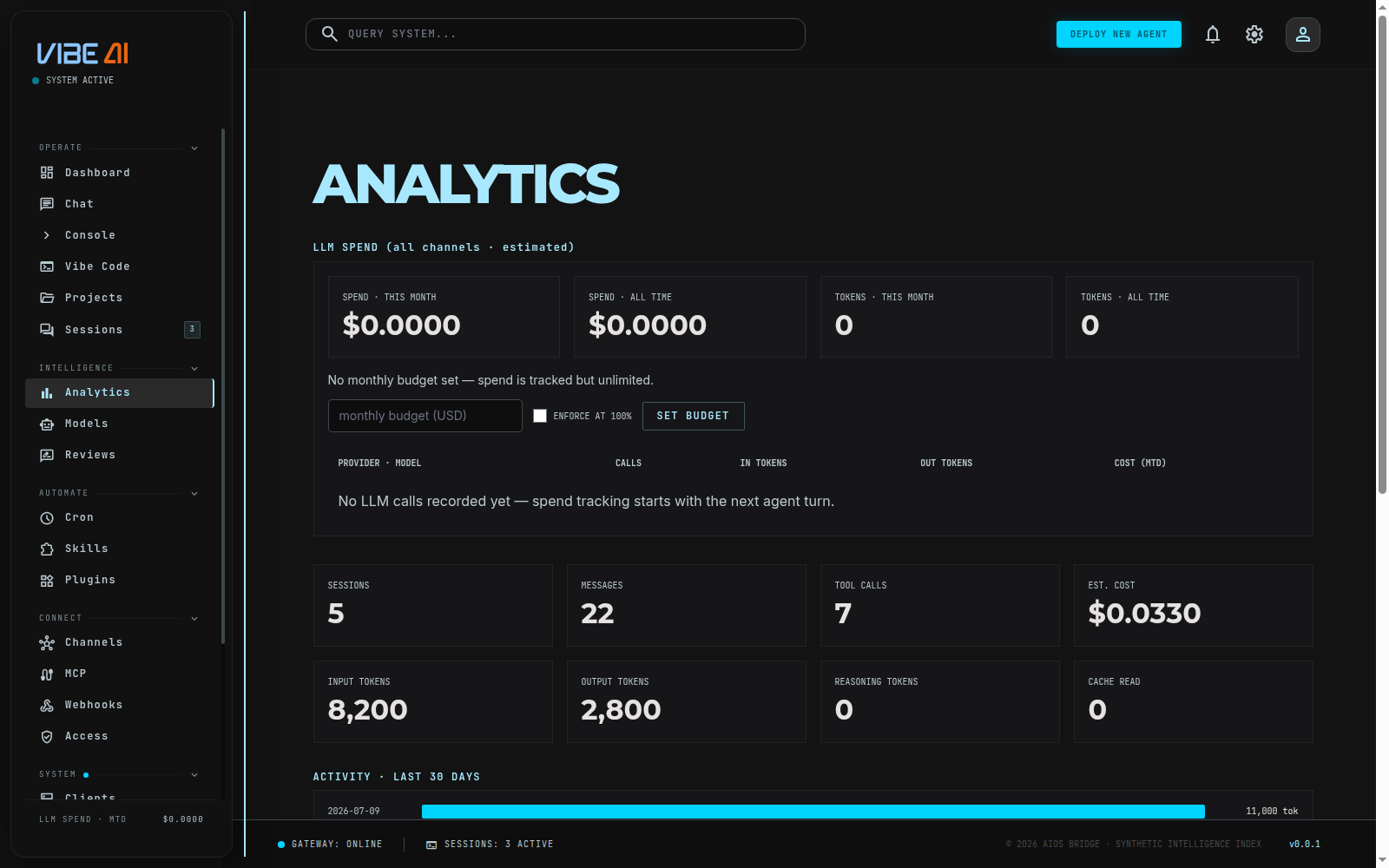
The page loads a single endpoint, GET /api/analytics/usage, and renders
it top to bottom:
- LLM spend (all channels · estimated) — spend/token tiles for this
month and all-time, the budget bar (see below), and a provider · model
table of calls/in-tokens/out-tokens/cost-to-date. This section comes from
the harness’s own usage ledger — every call from TUI, web chat, voice,
Telegram, cron, meta-review, and
aios -plands here with tokens and estimated cost. - Session store tiles — sessions, messages, tool calls, estimated
cost, input/output/reasoning tokens, cache-read tokens. Pulled straight
from the sessions database (
SUMoversessions), so an empty store reads as all zeros — nothing here is fabricated. - Activity · last 30 days — a bar per day, sized by token volume.
- By model and by source — the same session-store data broken out by model and by channel (tui / telegram / discord / …).
- Top sessions by tokens — the 8 heaviest sessions, with source, model, message count, and tokens.
Two different totals appear on this page on purpose: the LLM spend section is the harness ledger (every model call, cache-aware cost), while the session store tiles below it aggregate the sessions table directly. They track closely but aren’t the same query — see Harness for how the ledger itself works.
Setting a monthly budget
Under the spend tiles: a monthly budget (USD) input, an ENFORCE AT
100% checkbox, and a SET BUDGET button. Saving calls
POST /api/analytics/budget with {monthly_budget_usd, enforce}, which
the dashboard persists straight into ~/.aios/harness.json
(monthly_budget_usd, budget_enforce).
-
Budget set, checkbox off (default) — display-only. The bar fills as the month’s spend grows, turns amber past 80% and red at 100%, but no turn is ever refused.
-
Budget set, checkbox on — enforcement is live. Once this month’s estimated spend reaches the budget, the harness’s
budget_block_reasoncheck fires and every channel (TUI, web chat, Telegram, cron,aios -p, …) refuses new turns with:monthly LLM budget reached ($X.XX of $Y.YY this month). Raise the budget or disable enforcement on the dashboard’s Analytics page to continue.
Enforcement is strictly opt-in — a budget with the checkbox left unchecked never blocks anything, it only draws the bar.
The dashboard itself is never blocked, even at 100%: Analytics is exactly where you go to raise the budget or uncheck enforcement, so you’re never locked out of the control that lifts the cap.
Leaving the budget input blank or at 0 means unlimited — spend is still
tracked, nothing is ever capped.