Channels
Every agent profile's messaging bots — status, tokens, and gateway control.
Web UI → Channels shows the messaging platforms each agent
bridges — one card per agent profile × platform. It reads /api/channels,
which enumerates every profile under ~/.aios/agents (plus the default
profile) and checks each one’s own secrets-vault scope for a
bot token.
What each card shows
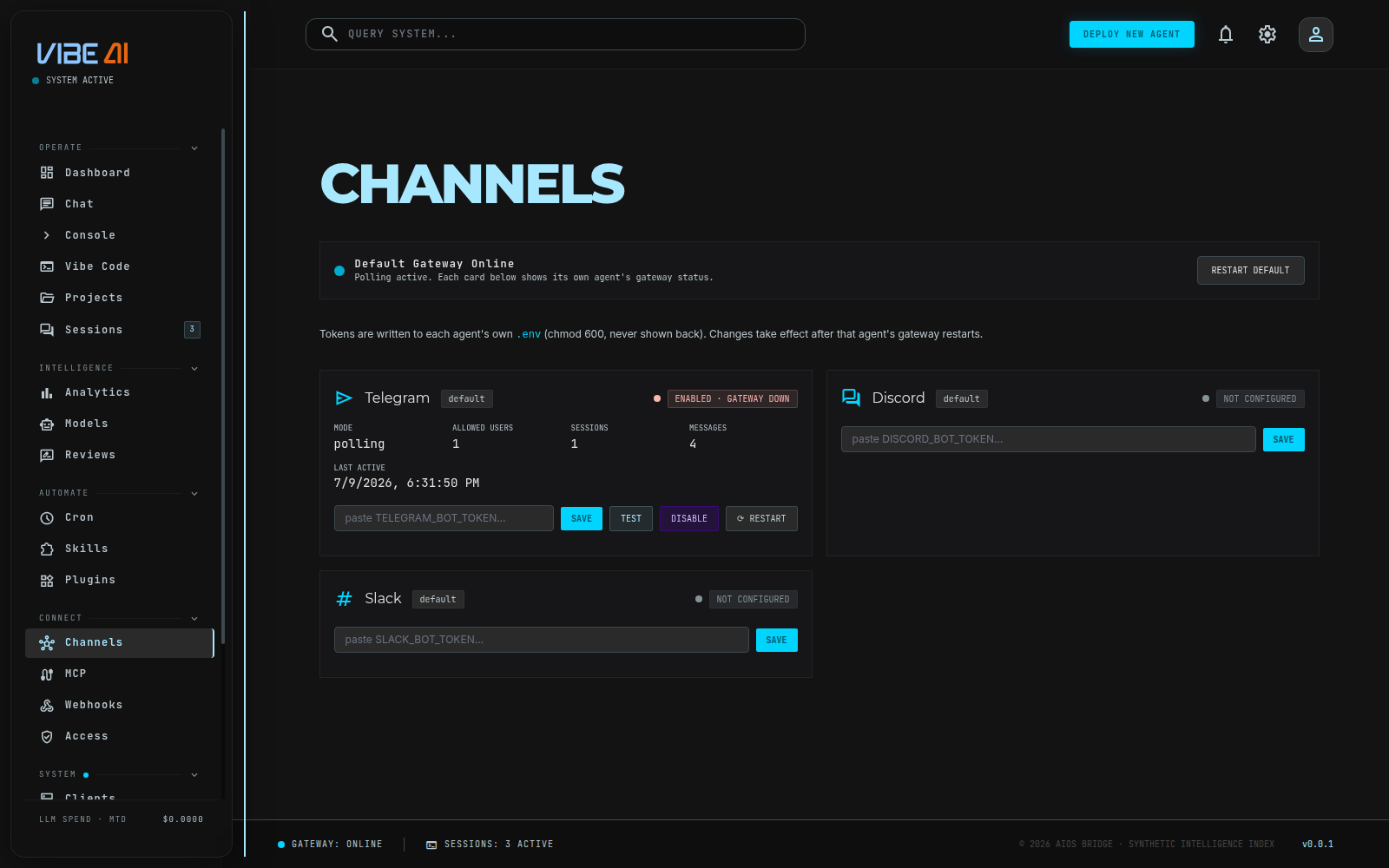
- Platform — Telegram, Discord, or Slack (the only three the backend knows about today), with the agent profile name it belongs to.
- State —
NOT CONFIGURED(no token),DISABLED(token stored but disabled in the vault),ENABLED · GATEWAY DOWN, orCONNECTED. A rotation-age chip appears beside the state when the token has one:rotation due · N d,overdue · N d, orsnoozed until <date>— the same reminders the Keys page tracks. - Identity — for Telegram, the live
@usernamefrom a real Bot APIgetMecall against the stored token (proof the token actually works, not just that a string is present). - Mode — always
polling. AIOS gateways long-poll each platform; there is no inbound webhook endpoint (see Webhooks). - Allowed users, sessions, messages, last active — allowlist size from
TELEGRAM_ALLOWED_USER, and activity counts read straight from that profile’s ownsessions.db.
The default profile always shows all three platforms, configured or not, so there’s somewhere to set one up. Named profiles only show platforms they’ve already configured — a fleet of Telegram-only agents doesn’t need two empty Discord/Slack cards apiece.
Managing a bot
Each card has:
- Token field + SAVE — stores the platform’s token
(
TELEGRAM_BOT_TOKEN,DISCORD_BOT_TOKEN, orSLACK_BOT_TOKEN) in that profile’s own vault scope, encrypted, never echoed back to the browser. - TEST — calls
getMe(Telegram) or otherwise confirms the token is set. - DISABLE / ENABLE — flips the vault row’s disabled flag rather than deleting it, so re-enabling doesn’t require re-pasting the token.
- RESTART — restarts that profile’s gateway unit
(
aios-gateway.servicefor default,aios-gateway@<name>.servicefor a named agent) so the change takes effect.
Token edits and enable/disable toggles only take effect after the
profile’s gateway restarts — the button does exactly that for you. The
CLI equivalent is aios secrets set TELEGRAM_BOT_TOKEN --scope agent:<name>, then restart the unit yourself.
Each agent’s bot is otherwise identical to the CLI-era setup described in
Agents → Talking to an agent: set the
token, systemctl enable --now the profile’s gateway unit, done.