System
Host health, service states, remote access, and self-update — plus where everything lives on disk.
Web UI → System is the box-level health page: host resource usage,
AIOS service states, remote-access status, and the self-update card,
pulled from GET /api/system/stats (and, for updates, GET /api/update/status).
Host
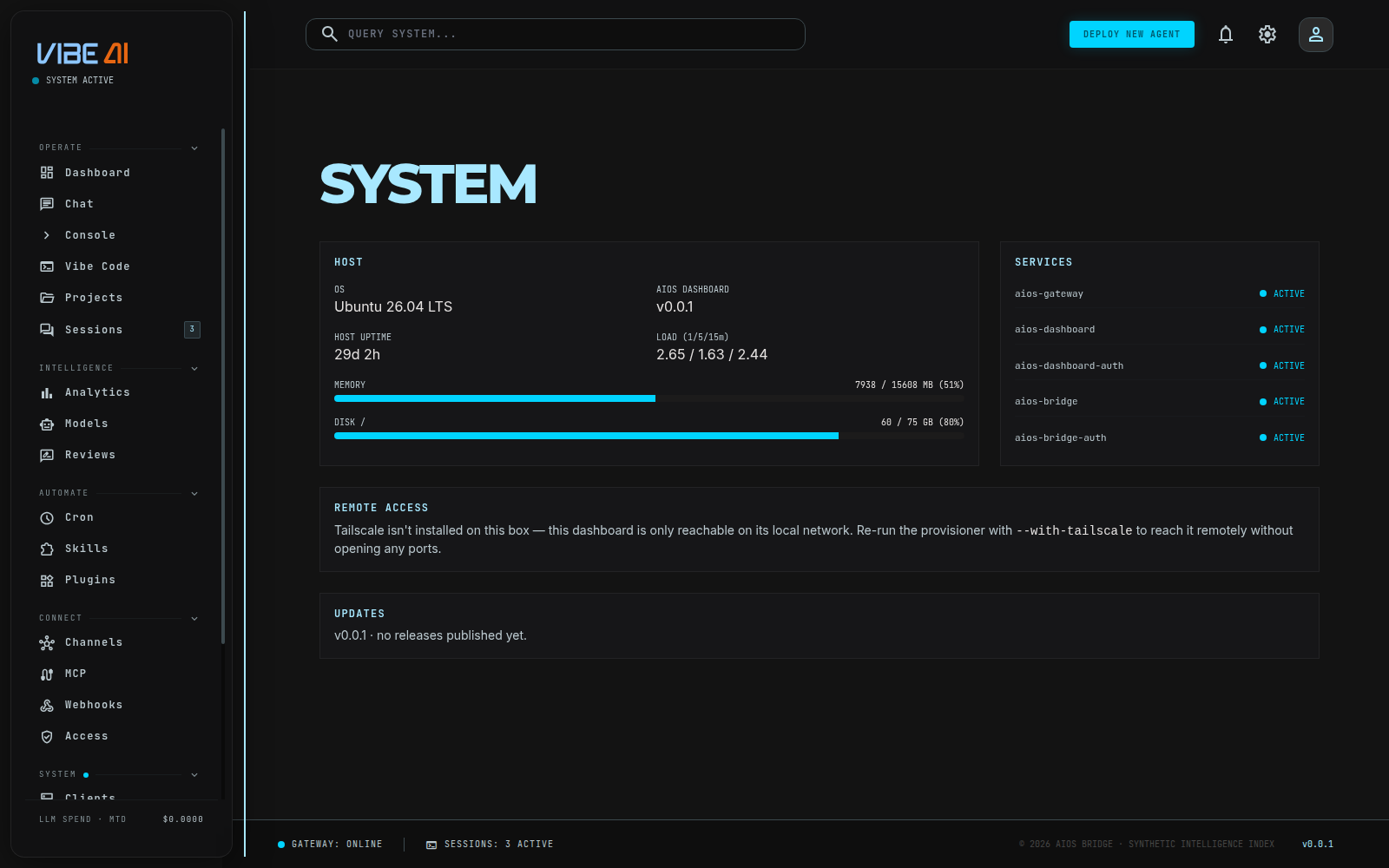
- OS — the distro’s
PRETTY_NAMEfrom/etc/os-release. - AIOS DASHBOARD — the running dashboard binary’s version.
- HOST UPTIME — from
/proc/uptime. - LOAD (1/5/15m) — from
/proc/loadavg. - MEMORY — used/total in MB from
/proc/meminfo, with a bar that turns red past 85% used. - DISK / — used/total in GB for the root filesystem (
df -BG /), same red-past-85%-used treatment.
Services
One row per AIOS systemd unit, each a green ACTIVE or red DOWN
dot from systemctl is-active <unit>.service:
aios-gatewayaios-dashboardaios-dashboard-authaios-bridgeaios-bridge-auth
Remote access
The REMOTE ACCESS card on this page reports Tailscale status — it’s how a desktop or unlisted-domain install is reachable from another device without port-forwarding or public DNS. Three states:
- Not installed — Tailscale isn’t on this box; re-run the provisioner
with
--with-tailscaleto enable it. - Connected — green dot, shows the tailnet hostname/IP to reach this dashboard at.
- Installed, not connected — red dot, prompts you to run
tailscale up.
This card only covers reaching the dashboard itself from another device. Voice-link device pairing and the Telegram messaging allowlist are a separate concern, covered on the Access page.
Vault
The VAULT card is the health view of the secrets vault:
state, store path, where the vault key (KEK) lives (the owner-read-only
.kek file beside the store), how many keys are stored per scope, whether
a vault-key backup has been taken, rotation reminders coming due, any
rows that fail to decrypt, and stray plaintext files the migration
flagged. Four actions, each an inline strip on the card:
- BACKUP — download the vault key wrapped under a passphrase (12+ characters). Store it offline; it’s the recovery path for a lost KEK.
- RESTORE — upload that backup to put the vault key back. Running services pick the restored key up live — no restart.
- ROTATE — re-encrypt every stored key under a fresh vault key. The old backup stops opening this store, so take a new backup after.
- RESET — wipe the vault: every stored key and the vault key. You
must type the word
RESETto confirm. Your account survives; the onboarding wall returns at the provider step so you can re-enter keys.
If the vault key ever goes missing (a deleted or lost .kek file), a
banner appears at the top of every dashboard page and the
API stays reachable so you can repair it: restore your backup here (or
aios secrets kek-restore), or reset and re-enter keys. Without a
backup, the stored values are unrecoverable by design — that’s what
the encryption promises.
The same summary is one line in aios status (secrets: N keys · N due · N overdue · vault key backed up: yes/no), and aios doctor’s exit code
is scriptable: 2 when the secrets-vault check fails, 1 for any other
failing check, 0 otherwise (warnings don’t change the exit code).
Updates
The UPDATES card checks GET /api/update/status for a newer release:
- No releases published yet — shows the current version only.
- Up to date — green dot, current vs. latest version shown.
- Update available — pulsing dot, current → latest version, a link to
release notes, and either:
- APPLY & RESTART button (Linux only) — calls
POST /api/update/applyafter a confirmation dialog. This restartsaios-gatewayimmediately; you still have to restart the dashboard itself manually afterward (systemctl restart aios-dashboard) since it can’t safely restart itself mid-response. - A note to run
aios update applyfrom a terminal, for macOS/desktop installs (source rebuild) or unsupported platforms.
- APPLY & RESTART button (Linux only) — calls
Where everything lives
| Path | Contents |
|---|---|
/root/.aios | config, encrypted secrets.db (+ root-only .kek vault key on Linux), sessions.db, harness.db, memories/, projects/, agents/ |
/root/.aios-control/ | mothership tenant registry |
/root/.aios-license-keys/ | license signing key (mothership only) |
/etc/systemd/system/aios-* | service units |
/etc/nginx/sites-available/ | gateway + project sites |
/var/backups/aios/ | backups |
For the CLI/API-level view of the same on-disk layout — what each running binary is called and where it’s installed — see the “What a running install looks like on disk” table in Getting Started.