Models
Switch the active provider and model from the dashboard.
Web UI → Models shows the model currently driving agents and every other provider you could switch to — and switching is a click, not a config edit.
Active model
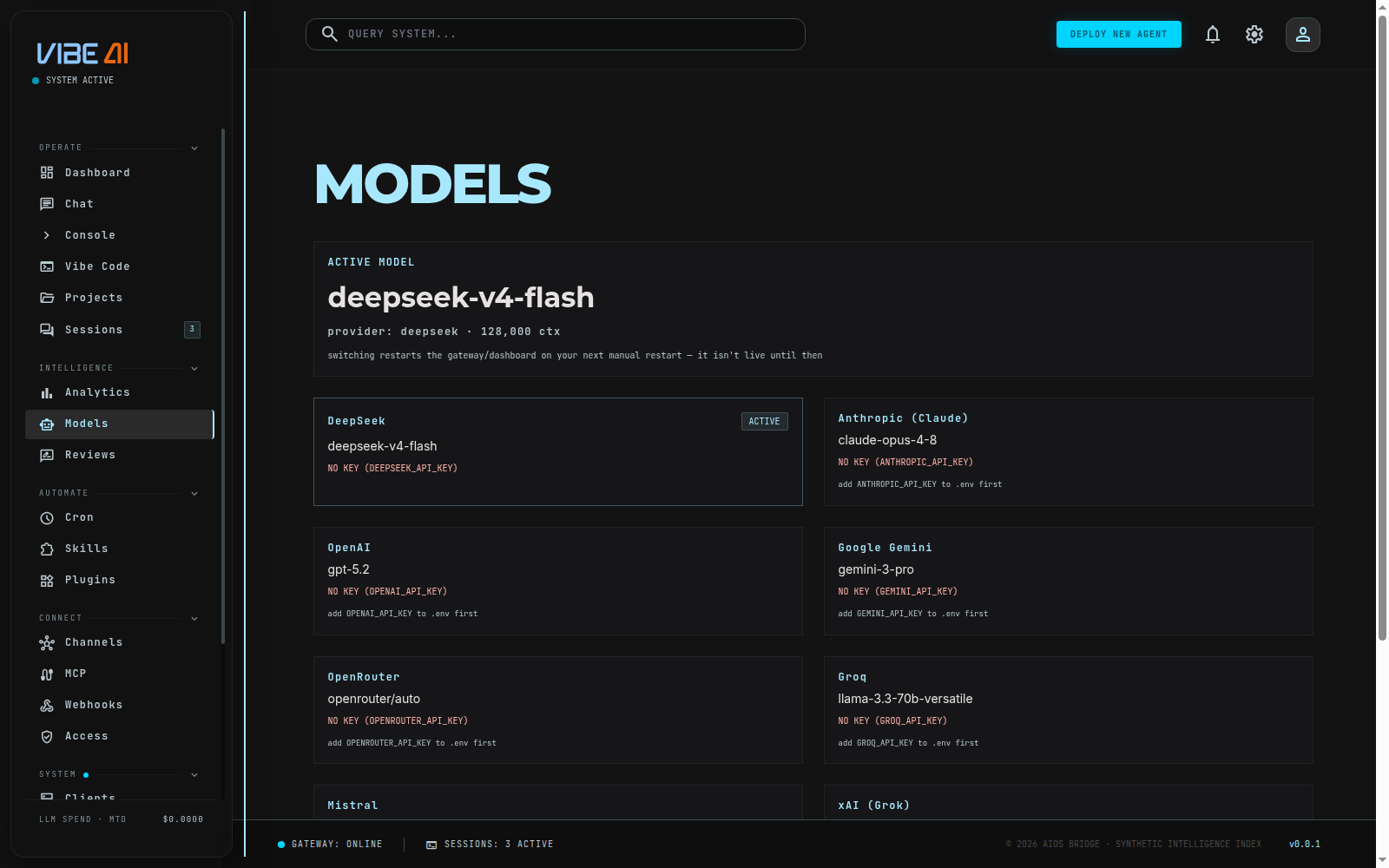
The top card (GET /api/model/info) shows the model name, provider, and
effective context length currently in use. This is resolved the same way
every runtime resolves it — from ~/.aios/config.yaml via the shared
provider-resolution logic — so what you see here is exactly what agents
are using, not a cached guess.
Switching providers
Below it, one card per known provider (GET /api/model/options), each
showing:
- its model list (or default model if none are enumerated)
- an ACTIVE badge on the current one
- KEY CONFIGURED / NO KEY NEEDED / NO KEY (
ENV_VAR_NAME) — whether that provider’s API key is present in the secrets vault
A provider without a key shows an ADD KEY field right on its card — paste the key there and it’s stored encrypted in the vault and live-validated on the spot (a configured provider hides the field behind CHANGE KEY). No switch button appears until a key is configured.
You’ll be prompted for a model name, pre-filled with that provider’s default. Leave it blank to use the provider’s default model.
The switch calls PUT /api/model/active {provider, model}, which
merges model.provider / model.default into config.yaml
(preserving every other key, with a config.yaml.bak backup) and
returns restart_required: true. The dashboard shows an alert telling
you to restart the gateway/dashboard — both read config once at
startup, so the switch isn’t live until then.
Re-serializing config.yaml through the switcher drops any comments in
the file, the same limitation the raw YAML editor on the
Config page doesn’t have. Acceptable here since
config.yaml is machine-scaffolded rather than hand-authored with
commentary.
Thinking mode (reasoning effort)
The active-model card carries a THINKING MODE toggle — OFF / LOW / MEDIUM / HIGH. It sets how much the model “thinks” before answering: higher levels help with architecture planning and deep debugging, lower levels keep responses fast and spend low.
- The control calls
PUT /api/model/reasoning {effort}, which persistsagent.reasoning_effortinconfig.yaml(same merge-and-backup discipline as the provider switcher). OFF removes the key entirely, so no effort field is ever sent on the wire — it’s a toggle on top of your setup, never a replacement for it. - The setting is provider-aware: Anthropic models receive it as native
adaptive-thinking effort (never sent to Haiku models, which don’t
accept it); OpenAI-compatible providers — including reasoning models
like DeepSeek V4 or Moonshot’s Kimi K3 — receive it as
reasoning_effort. - Like a provider switch, it takes effect on the next gateway/dashboard
restart. The TUI’s
/reasoningcommand is the same setting from the terminal, and its choice survives backend restarts.
Effect on the harness
Switching providers doesn’t just change which model answers directly —
the harness’s cheap/frontier tiers realign to the new provider
automatically (e.g. anthropic → Haiku/Opus, deepseek → flash/pro;
providers without tier presets, like moonshot, run both tiers on their
default model). See
Agents and Harness for how tier routing
works.
CLI / TUI alternative
The same switch is available without the dashboard: the TUI’s model
picker, or hand-editing model.provider / model.default in
config.yaml directly. Functionally identical — the dashboard is just the
faster path for most changes.